
The question nobody asks until it is too late
When I review a small company's systems, one of my first questions is simple: "If your main server died tonight, how long until you are back in business?"
The answer is almost always "we have backups". That is a different answer to a different question. Having backups means a copy of your data exists somewhere. Being able to recover means you know where it is, that it is clean, that it is recent enough, and that someone can actually bring the business back from it in a known amount of time.
I have spent more than ten years building and looking after software, including banking systems and platforms for the Bangladesh Navy and Army, and working as a bug hunter on the attacker's side of the fence. The pattern I see again and again is the same. Backups get set up once, a green tick appears on a dashboard, and nobody looks again until the day they need them.
This post is about closing that gap. It is written for founders and small business owners in the US, UK, UAE, and anywhere else, who do not have a full time IT team and do not need one to get this right.
Small businesses are the main ransomware target now
There is a comfortable myth that criminals only go after big companies. The data says the opposite.
Verizon's 2025 Data Breach Investigations Report analysed 12,195 confirmed breaches. Ransomware was present in 44% of all breaches, up from 32% the year before. In large organizations it was part of 39% of breaches. In small and medium sized businesses it was part of 88%.
The report's own explanation is blunt: attackers are happy to breach smaller organizations and adjust the ransom to fit, and it is "a bonus for the attacker" that SMBs are less likely to have up to date, readily available backups.
Ransomware is not the only way to lose a server. Disks fail, people delete the wrong folder, updates go wrong, and hosting providers have bad days. But ransomware is the scenario that tests your backups hardest, so it is the right one to plan around.
Attackers go after your backups first
Modern ransomware groups know that a business with good backups does not need to pay. So they look for the backups before they encrypt anything.
Sophos surveyed 2,974 IT and security professionals whose organizations had been hit by ransomware, for its report on the impact of compromised backups on ransomware outcomes. It found that:
- 94% said the attackers tried to compromise their backups during the attack.
- 57% of those attempts succeeded.
- Organizations whose backups were compromised were almost twice as likely to pay the ransom (67% vs 36%).
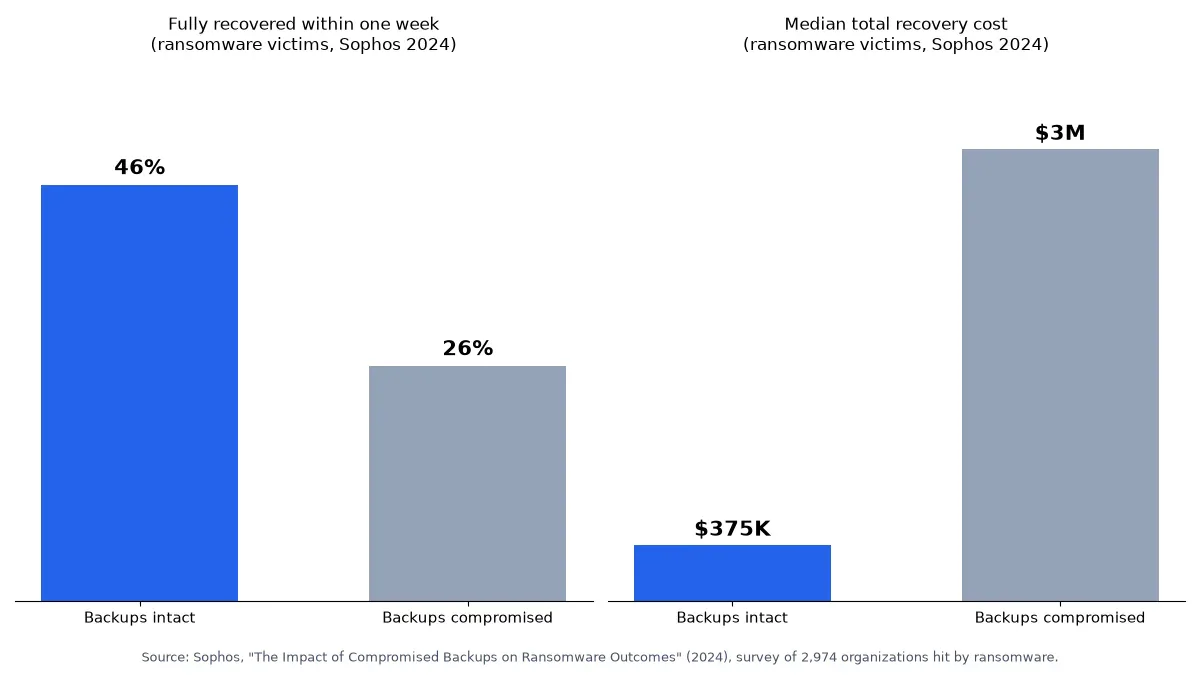
- Their median total recovery cost was $3 million, against $375,000 for those whose backups survived. That is eight times higher.
- Only 26% were fully recovered within a week, compared with 46% when backups were intact.
Veeam's 2025 Ransomware Trends report, based on 1,300 organizations, tells a similar story. In its research, 89% of organizations had their backup repositories targeted, and on average a third of those backups were modified or deleted. Of the organizations attacked, only 10% recovered more than 90% of their data, and 57% recovered less than half.
If your backup sits on the same network, with the same admin password, as the server it protects, an attacker who gets one usually gets both.
Two numbers every owner should know: RTO and RPO
You do not need to become an IT person to plan recovery. You need to decide two numbers, and then check whether your setup can actually hit them.
- RTO, recovery time objective. How long can you be down before it really hurts? An online shop might say four hours. A consultancy might cope with two days.
- RPO, recovery point objective. How much data can you afford to lose? If you back up once a night at 2 AM and the server dies at 5 PM, you lose fifteen hours of orders, invoices, and customer messages. Is that acceptable?
These are business decisions, not technical ones. The owner should set them. The technical team's job is to build something that meets them and prove it does.
For a rough sense of what downtime costs, ITIC's 2024 Hourly Cost of Downtime survey of more than 1,000 firms found that over 90% of mid-size and large enterprises put the cost of one hour of downtime above $300,000. Among SMBs with 20 to 100 employees, 57% said an hour cost them up to $100,000. Your number will be smaller or larger, but it is worth working out. It tells you how much a faster recovery is worth paying for.
The 3-2-1 rule, and the extra 1 that matters now
The classic advice comes from US government guidance. CISA's data backup options paper describes the 3-2-1 rule:
- Keep 3 copies of important data: the original plus two backups.
- Store them on 2 different types of media or storage.
- Keep 1 copy offsite, away from your main location.
The UK's National Cyber Security Centre gives the same message in its small business guide to backing up your data: identify what you need to back up, keep a backup separate from your main systems, and make backing up part of everyday business.
Because attackers now hunt for backups, many teams add one more rule: at least one copy should be offline or immutable, meaning it cannot be changed or deleted, even by someone with admin access, for a set period. Veeam calls the full version 3-2-1-1-0, where the final 0 means zero errors when you test a restore.
"Offsite" has to really mean offsite
In March 2021 a fire destroyed OVHcloud's SBG2 data center in Strasbourg, one of the largest hosting providers in Europe. Many customers had paid for backups. According to court rulings reported by DatacenterDynamics, at least two of them found out afterwards that their backups had been kept in the same building as their live servers, and lost both.
The lesson is not about one provider. It is that you should know, in plain words, where each copy of your data physically lives, and that at least one copy sits with a different provider or in a different region from your production system. "Backups included" on a hosting plan is a starting point, not a plan.
A backup you have never restored is a hope, not a plan
This is the part almost everyone skips. In Veeam's research, 98% of organizations had a ransomware playbook, but only 44% included backup verification and frequency in it. The plan existed. The proof did not.
A simple restore test, once a quarter, catches most of the problems I see in the field:
- The backup job has been failing quietly for months.
- The database backup is there, but the uploaded files and images are not.
- The backup exists, but the encryption key or password to open it was in the head of a developer who left.
- Everything restores, but nobody wrote down how, so it takes three days instead of three hours.
Here is a practical routine for a small team:
- List what matters. Databases, uploaded files, app configuration, DNS settings, email, and the passwords and keys needed to rebuild.
- Set your RTO and RPO for each, as above.
- Apply 3-2-1, with one copy offline or immutable and stored with a different provider or account from production.
- Separate the credentials. The account that can delete backups should not be the same account your server or day to day admin uses, and it should have multi factor authentication.
- Turn on alerts for failed backup jobs, and make sure a real person reads them.
- Restore for real every quarter. Spin up a test copy from backup, time it, and compare the time and data loss against your RTO and RPO.
- Write a one page runbook. Who does what, in what order, with which logins, if the main system is gone. Keep a copy somewhere that does not depend on the system you are recovering.
When I think like an attacker, the backup server is one of the first things I look for, because it holds everything and it is usually the least watched machine in the building. Protect it like it is your most valuable system, because on your worst day it is.
Signs your recovery plan is weaker than you think
- Nobody can tell you when the last successful backup ran.
- You have never restored a full system, only the odd file.
- Your backups live with the same hosting provider, or the same cloud account, as production.
- One person holds all the keys and passwords needed to restore.
- Your hosting plan says "daily backups" and that is the whole plan.
If two or more of those are true, the recovery time you would actually face is probably measured in days, not hours.
How we help
At Fionetix we build and look after software for founders and SMBs in the US, UK, UAE, and beyond, and a lot of our work starts with systems someone else built.
- Not sure where you stand? Our hourly consultancy is $30. In an hour or two we can review where your data lives, how it is backed up, and how long a restore would really take, and give you a short, prioritised list.
- Running on an old or fragile server? Our Legacy Fix & Server package ($1,999) is built for exactly this: stabilising older systems and getting the server side, including backups and recovery, into a state you can rely on.
- Want someone watching it every month? Our Software Maintenance retainer at $1,899 a month covers patches, updates, monitoring, and the routine checks that keep backups honest.
Whatever we work on, you own 100% of the code and data. We just make sure you can get it back.
Find out your real number
Pick a quiet afternoon this month. Ask your team, or your provider, to restore your main system from backup into a test environment, and time it. That single number tells you more about your business risk than any dashboard.
If the answer is "we are not sure how", that is fine. It is far cheaper to find out now than on the night it matters.