

The leads you never hear about
When a website is down, someone notices. When a website is slow, almost nobody does.
There is no error message. No angry email. A potential customer on a phone in London, Dubai, or Dallas taps your ad, waits, gets bored, and hits back. Your analytics shows a bounce. Your sales team never knows that lead existed.
I see this pattern a lot when founders ask us to look at a site that "gets traffic but doesn't convert". The copy gets blamed. The design gets blamed. The ads get blamed. Very often the real problem is that the page takes four or five seconds to become usable on a mid-range phone.
So let's put numbers on it, then go through what to fix, in order.
What speed is actually worth
Two studies are worth knowing here.
The first is from Portent, a US digital marketing agency. In their 2022 site speed research they looked at over 100 million page views across 20 sites, 14 of them B2B lead generation sites, ranging from national travel brands to small niche SaaS companies. For lead generation sites they found:
- A site that loads in 1 second has a conversion rate 3x higher than a site that loads in 5 seconds, and 5x higher than one that loads in 10 seconds.
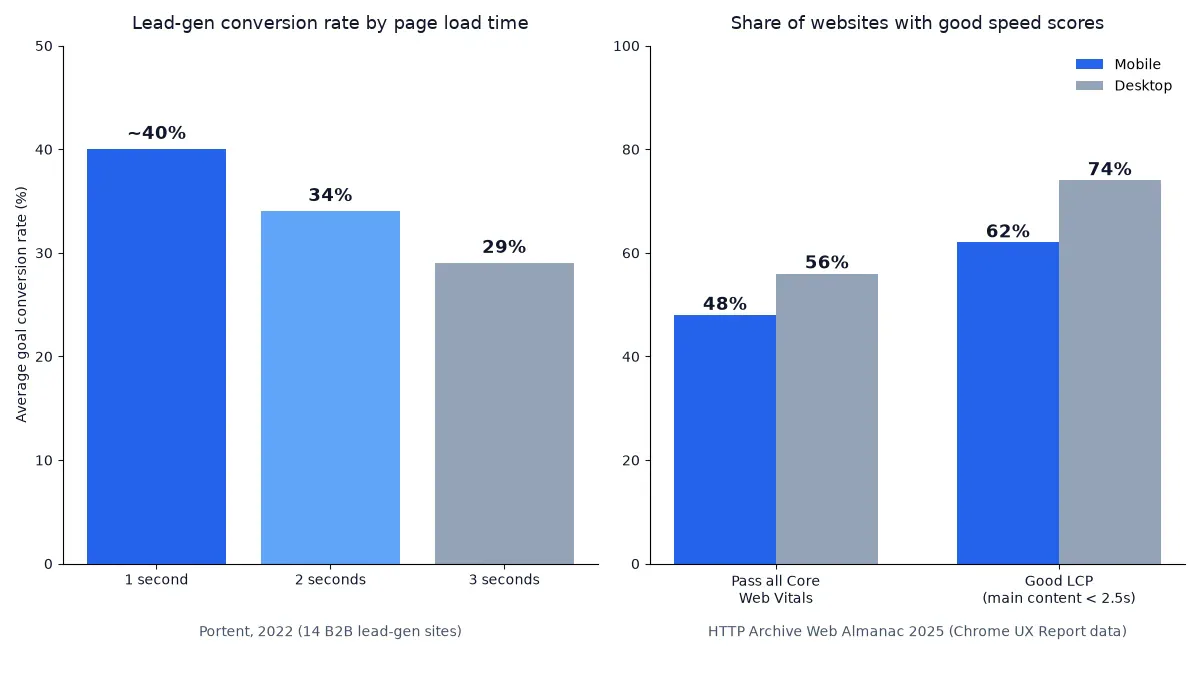
- The average goal conversion rate was almost 40% at 1 second, 34% at 2 seconds, and 29% at 3 seconds.
- Above 5 seconds, you are looking at roughly half the conversion rate of a fast site.
- And site speed had barely moved since their 2019 study. Most sites are not getting faster on their own.
The second is Milliseconds Make Millions, a study commissioned by Google and run by Deloitte and 55. It tracked 37 European and American brands across 30 million mobile sessions, with no redesigns during the study, so speed was the thing that changed. With just a 0.1 second improvement in mobile speed:
- Retail conversions rose 8.4% and average order value rose 9.2%.
- Travel conversions rose 10.1%.
- Bounce rate on lead generation information pages improved 8.3%.
A tenth of a second. That is less time than a blink.
How most sites actually perform
You might assume most websites are fast by now. They are not, especially on phones.
The HTTP Archive Web Almanac 2025, which uses real-user data from Chrome, found that:
- Only 48% of mobile sites pass all three Core Web Vitals, compared with 56% on desktop. That means more than half of mobile sites give real visitors a below-par experience.
- Only 62% of mobile sites have a good Largest Contentful Paint (LCP), the time it takes for the main content to show up. On desktop it is 74%.
- About 16% of pages lazy-load their main image, which delays the very thing visitors came to see.
- 62% of mobile pages have at least one image without set dimensions, which is a common cause of content jumping around while the page loads.
Here is the uncomfortable part for founders targeting the US, UK, and UAE. Your buyers are mostly judging you on a phone, often on the move. Your team is testing the site on a fast laptop on office Wi-Fi. Those are two very different websites.
Core Web Vitals in plain English
Google uses three measurements, called Core Web Vitals, to judge real-world page experience. They also feed into search rankings, so a slow site can cost you traffic before it costs you conversions.
- LCP (Largest Contentful Paint): how long until the main content appears. Good is under 2.5 seconds.
- INP (Interaction to Next Paint): how quickly the page responds when someone taps or clicks. Good is under 200 milliseconds.
- CLS (Cumulative Layout Shift): how much the page jumps around while loading. Good is a score under 0.1.
If you remember one thing: LCP is where most sites lose, and it is usually the cheapest one to fix.
Check your own site in ten minutes
You do not need a developer for this part.
- Open PageSpeed Insights and enter your homepage. Then do the same for your main landing page and your pricing or contact page. Those are the pages that make you money.
- Look at the top section first, labelled with real user data. That is what your visitors actually experience. The lab score underneath is useful for debugging, but it is a simulation.
- Check the Mobile tab, not just Desktop.
- Write down LCP, INP, and CLS for each page, and whether each one passes.
If your site does not have enough traffic for real user data, the lab results are still a decent guide. Anything over 4 seconds for LCP on mobile is worth fixing this month.
What to fix first
These are in the order I would usually tackle them, because the early ones are cheap and the payoff is fast.
1. Shrink and serve images properly
Images are the most common reason for a slow LCP. The usual fixes:
- Convert large JPEGs and PNGs to modern formats like WebP or AVIF.
- Serve smaller images to phones instead of shrinking a 4,000 pixel photo in the browser.
- Never lazy-load the main hero image. Lazy-load the images further down instead.
- Set width and height on every image so the page does not jump around.
2. Cut the third-party scripts
Chat widgets, heatmaps, three analytics tools, two ad pixels, a cookie banner, and a font loader. Every one of them competes with your actual content. Go through the list with your marketing team and remove anything nobody has looked at in the last three months. Load the rest after the main content.
3. Put a CDN in front of the site
If your server is in one country and your buyers are in three others, distance alone adds delay. A content delivery network such as Cloudflare serves your pages and files from a location close to each visitor. For a business selling into the US, UK, and Gulf at the same time, this is often one of the biggest single wins, and it can be set up in a day.
4. Fix the slow server responses
If the server takes a second or more just to start responding, no amount of front-end polish will save you. Common causes are no page caching, slow database queries, an overloaded shared hosting plan, or a CMS with too many plugins. This is where an engineer earns their fee.
5. Lighten the JavaScript
Modern sites often ship far more JavaScript than they need. That hurts INP, because the phone is busy running code instead of responding to taps. Splitting code so each page only loads what it uses, and removing unused libraries, makes a real difference on mid-range Android phones, which is what a lot of your visitors carry.
Founders spend thousands a month buying traffic and then send it to a page that takes five seconds to load on a phone. Fixing speed is one of the few marketing upgrades where you can measure the result the same week.
What can wait
- A full redesign. A slow site with a new look is still a slow site. Fix speed first, then redesign if the numbers still disappoint.
- Chasing a perfect 100 lab score. Passing Core Web Vitals for real users is the goal. The last few points rarely move revenue.
- Rebuilding on a new framework. Sometimes it is the right call, but most sites can pass Core Web Vitals on their current stack with the fixes above.
How we help
At Fionetix, performance tuning is a normal part of the work, not an extra. If you want your site fast without hiring a performance specialist:
- Our Legacy Fix & Server package ($1,999) covers diagnosing and fixing issues, performance and security hardening, and server setup and management, with a documented handover.
- Our Software Maintenance retainer ($1,899 a month, or $499 a week) includes uptime and performance monitoring, so the site stays fast after every new plugin, script, and campaign landing page.
- Want a quick second opinion first? Hourly consultancy starts at $30. Send us your PageSpeed results and we will tell you honestly what is worth fixing.
You keep 100% of the code and IP from day one.
Start with three pages this week
Run your homepage, your main landing page, and your contact or pricing page through PageSpeed Insights on mobile. If any of them takes more than 2.5 seconds to show the main content, you have found leads you have been losing without knowing it.
The good news is that speed is one of the most fixable problems on a website. You do not need a rebuild. You need someone to look at it properly.