

Same customers, three different ceilings
A founder sits down with a working product and a phone in their hand. Bookings, a field team, a catalog, a membership. The question arrives in one sentence: should this be a native app, Flutter, or a website?
I have built software for more than ten years, including systems for banks and a subscriber app for a nationwide ISP. The sentence is the wrong shape. Native Swift, native Kotlin, React Native, Flutter, and a Progressive Web App are not three prices for the same thing. They are three ceilings. One of them will block a feature you have already promised a customer. The useful work is naming that feature before you pay anyone to build past it.
This is the version of that conversation I wish happened in week one, for founders selling in the United States, the United Kingdom, and the UAE. Bangladesh is in here too, because that is where a lot of our own delivery sits, and the phone mix is not the same.
Where the phones actually are
If you sell in the US or the UK, iPhone is not a later phase. If you sell in the UAE, Android is most of the traffic. A single native app covers one of those facts and misses the other.
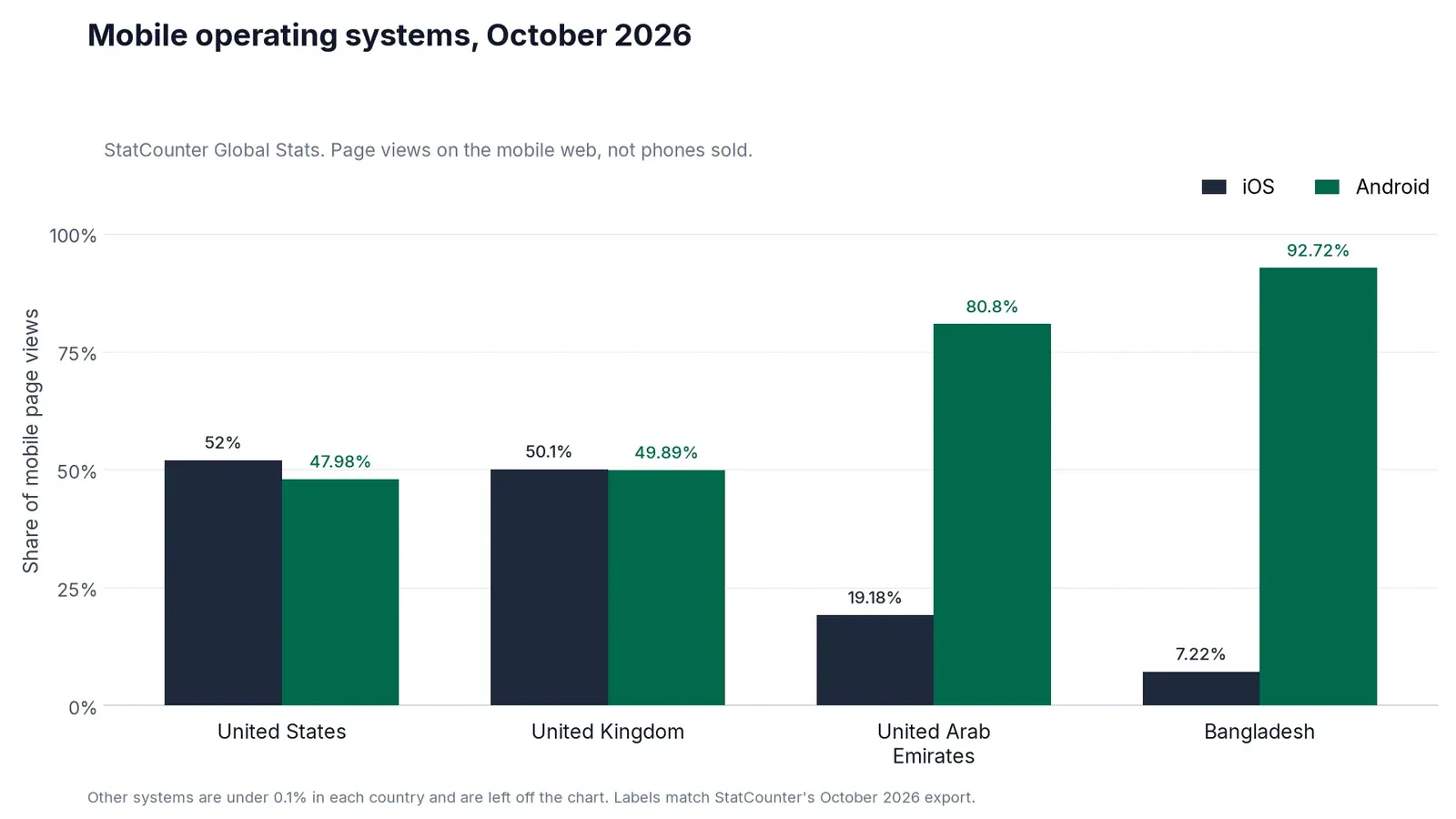
The October 2026 snapshot, from StatCounter's chart export:
- United States: iOS 52%, Android 47.98%. StatCounter, US
- United Kingdom: iOS 50.1%, Android 49.89%. The two are within a point of each other. StatCounter, UK
- United Arab Emirates: Android 80.8%, iOS 19.18%. StatCounter, UAE
- Bangladesh: Android 92.72%, iOS 7.22%. StatCounter, Bangladesh
The live pages move forward each month. The bars above are the October 2026 month, pulled on 9 November 2026.
Read that as traffic, not as a census of devices. It is still the shape that matters for a first release. A product that never opens on an iPhone misses the larger share of US mobile page views, and half of UK mobile page views. An Android-only first release can be an honest plan in the UAE or in Bangladesh. It is a weak plan if the buyer is in London, Manchester, Austin, or Dubai and you have told them the product is "on mobile."
A PWA is the one option that opens on all four of those mixes without a store account. A native app does not, until you build the second one.
Three products, not three flavors of one app
Native means Swift for Apple platforms and Kotlin for Android. Two codebases, two UI passes, two release trains. You get the most direct path to whatever that phone can do: camera pipelines, Bluetooth devices, NFC, background location, widgets, Live Activities, a watch app.
Cross-platform here means React Native or Flutter. One shared UI, shipped as a real app on both stores. React Native mounts the phone's own views, so a list on an iPhone is a platform list. Flutter paints its own widgets. Its Impeller renderer is the default on iOS, and on Android API 29 and above. On older Android versions, or devices without Vulkan, Flutter falls back to the older OpenGL renderer, according to Flutter's Impeller docs. When a plugin does not cover an API, both toolkits drop into native code. That native slice is part of the product, not a footnote.
A PWA is a website with a manifest and a service worker. People can add it to the Home Screen, use a cached shell offline, and, within limits below, receive push. There is no store review for the site itself. The ceiling is the browser. On iPhones used in the US, the UK, and the UAE, that browser is WebKit.
The 2026 Stack Overflow Developer Survey does not publish a React Native versus Flutter headcount. It does publish languages, and the hiring pool is lopsided. Of the 14,099 people who answered the language question, and people could pick more than one:
- JavaScript 62.0% (8,742)
- TypeScript 43.8% (6,171)
- Kotlin 10.8% (1,524)
- Swift 5.9% (831)
- Dart, the language Flutter apps are written in, 4.9% (697)
Source: Stack Overflow Developer Survey 2026, languages.
Among the 10,281 people who answered the web-framework question, 41.5% had done extensive work in React over the past year (4,265 people). That table is here. A React developer is not automatically a React Native developer. The distance is still shorter than hiring a Swift engineer and a Kotlin engineer who have never seen your product.
I use those numbers as a staffing fact. I do not use them as a quality ranking. A small Dart team that has shipped Flutter will beat a large JavaScript team that has never shipped a phone.
What each path can and cannot do
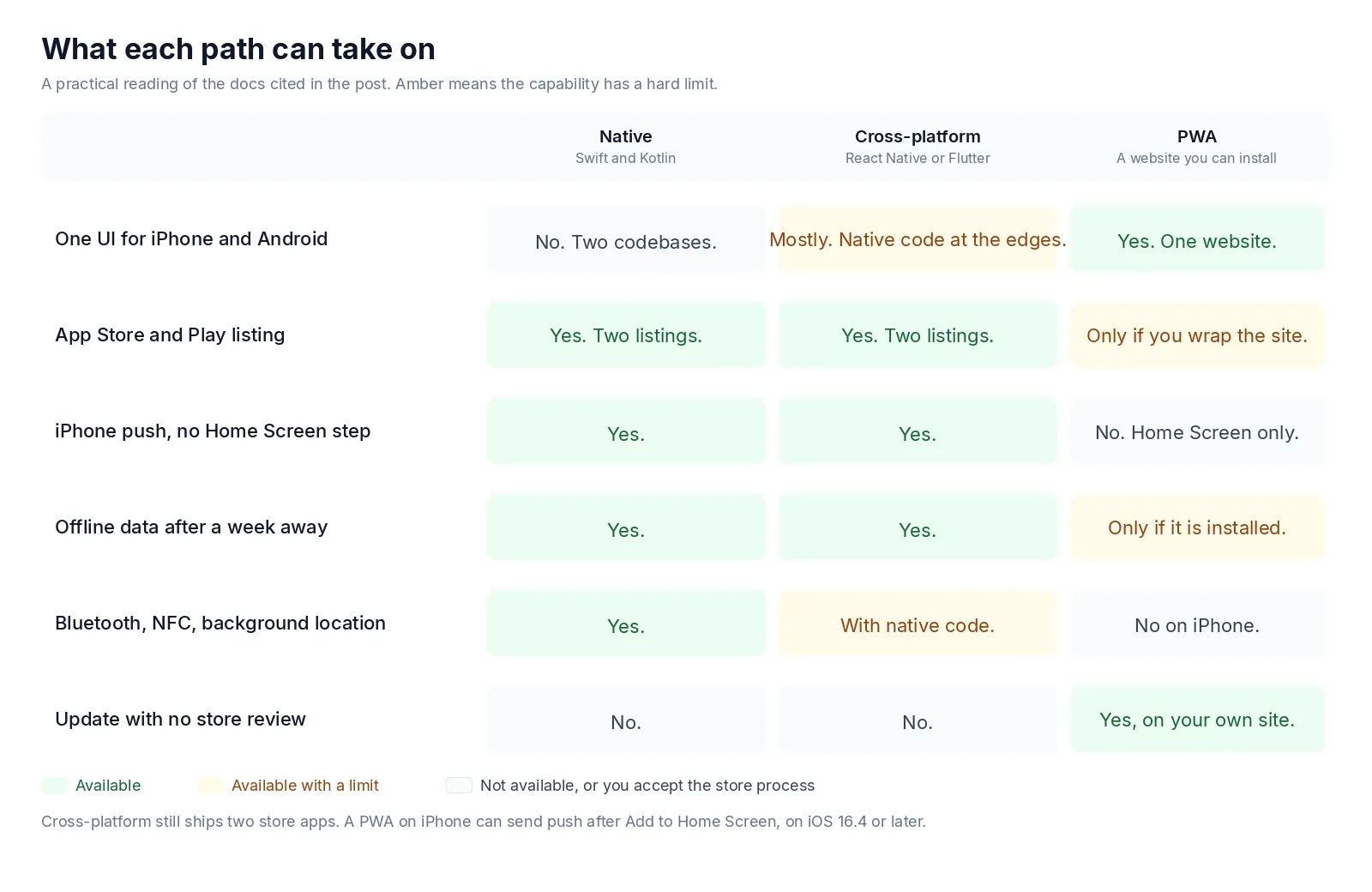
Push on an iPhone
Native apps and cross-platform apps send push through Apple Push Notification service. The user installs from the App Store, you ask for permission, and the notification shows up like any other app.
A PWA can do this too, and the limits are specific. Apple's documentation says to add Web Push to Home Screen web apps on iOS 16.4 or later, and to webpages in Safari 16 on macOS 13 or later. You do not need an Apple Developer Program membership to send it. The permission request has to come from a tap or a click. Safari does not support invisible pushes: if your service worker receives a push and does not show a notification, Safari revokes permission. The write-up is in Sending web push notifications in web apps and browsers and in WebKit's iOS 16.4 note.
The practical consequence: an iPhone user who only keeps your site as a Safari tab does not get that push. They have to add the icon to the Home Screen, and your manifest needs a standalone or fullscreen display mode for the installed app to be a real web app. Android Chrome can offer an install prompt through the beforeinstallprompt event. MDN documents that event for Chromium browsers. Plan on the Share sheet for iPhone.
If push is a convenience, "we will ask people to add the icon" is a fine plan. If the business is the notification, a missed delivery, a driver ping, a payment that has to interrupt the lock screen for someone who never added the icon, build the store app.
Offline, and the seven-day cap
A native app and a cross-platform app keep their local database the way any other app does. The operating system can still remove an unused app under storage pressure. That is a different rule from Safari's.
WebKit's tracking prevention deletes script-writable storage after 7 days without user interaction on the site. The list includes IndexedDB, LocalStorage, and service worker registrations and their cache. A website that was going to work offline in a tab can come back as a network error. WebKit's tracking prevention page states the cap, and then exempts the first-party domain of a Home Screen web app. The installed app's data is also kept separate from Safari.
So "our PWA works offline" is true for the icon on the Home Screen. It is not a promise about a bookmark in Safari that the customer has not touched in a week.
Device APIs, and performance without a fake benchmark
WebKit's same tracking prevention page lists APIs it has not implemented, including Web Bluetooth, Web NFC, WebUSB, and background geolocation. Android Chrome implements some device APIs that Safari does not. If the feature has to work for the iPhones in your US or UK traffic, an Android-only web API does not count.
Camera, microphone, and a one-time location check are normal on the mobile web. A Bluetooth scanner, an NFC tap, a widget, or a location trail that continues while the app is closed are native work. React Native and Flutter reach those through native modules. Budget the module, and a person who can maintain it, or you have bought a shared UI with a hole in it.
I am not going to quote a speed ranking. I have not run a benchmark that would survive a year, and most of the ones in marketing posts would not survive a week. What I will say from the architecture: Flutter compiles Dart to native code and draws its own pixels. React Native mounts the platform's controls. A PWA is a page. On iPhones outside the EU and Japan, App Store guideline 2.5.6 requires apps that browse the web to use WebKit. Apple offers an entitlement for other browser engines in the EU and Japan. Customers in the US, the UK, and the UAE are not in that entitlement. Chrome's icon on those iPhones is still WebKit, so your PWA's ceiling there is Safari's ceiling.
For accounts, forms, catalogs, and dashboards, customers rarely feel which of the three drew the screen. For a camera pipeline, a game, or a feed that has to feel like the apps that shipped with the phone, they do.
Stores: money, review, and the wrapped website
Account fees, before you sell anything:
- Apple Developer Program: 99 USD per membership year. Required to distribute on the App Store. Not required for Web Push on a PWA.
- Google Play Console: a one-time US$25 registration fee.
- A PWA on your own domain: no store account. The day you also want the store icon, you pay both, and the accounts should be in your company's name. I wrote the access checklist for that in Who Actually Owns Your Code?.
Commission applies when you sell digital goods. A free app with no in-app purchase does not pay it. Google's service fee page says 97% of developers distribute on Play at no charge. That page is the one to re-read, because the 2026 schedule is split by country.
Apple, from Schedule 2 of the developer agreement. The commission is 30% of the price the customer pays. For an auto-renewing subscription, it drops to 15% after that customer has had more than one year of paid service inside the same subscription group. The subscriptions page says the same thing from your side of the ledger: you receive 70% in that first year, then 85%, minus tax. The Small Business Program is a 15% commission if you and your associated accounts earned no more than 1 million USD in proceeds in the prior calendar year. New developers can qualify. If you are in the program, the subscriptions page says you receive 85% from the start, not after a year. Schedule 2 ties the reduced rate to the regions listed in its Exhibit B, which Apple updates in App Store Connect, so confirm the storefronts you actually sell in.
Apple has published different rates for some storefronts in 2026. The EU terms announced in August 2026 took effect on 1 October 2026. Mainland China moved to 25% standard, and 12% for the Small Business Program and for subscriptions after the first year, from 15 March 2026. Taiwan moved the standard rate to 26% from 31 October 2026. Those notices are China and Taiwan. The US, UK, and UAE were not in those three notices. Check anyway. The schedule is the contract, and it has been moving.
Google Play, for customers in the US and the UK. From 30 June 2026, Google split a service fee from a billing fee. The Android developers post says the service fee starts at 10% on your first 1 million USD of annual earnings, and that the same 10% applies to auto-renewing subscriptions. If the customer pays through Google Play Billing, add a 5% billing fee in the US, the UK, and the EEA. Alternative billing, and a link out to your own site, do not add that 5%. One-time digital purchases past the first million are higher. On the help-center table they are a 20% service fee when that user's first Play install or update was on or after 30 June 2026, and 25% when it was earlier, or 20% if an older install pays through an external web link. Add the 5% billing fee only when Play Billing processes the charge. Programs such as Apps Experience can lower some of those cells from 30 September 2026. I am paraphrasing a table. Open it.
Google Play, for customers in the UAE and other markets still on the older schedule. The same help page says that until the new fees roll out globally, developers enrolled in the 15% tier pay 15% on the first 1 million USD each year and 30% above it. Auto-renewing subscriptions are 15% regardless of revenue.
Which purchases even go through the store is a separate rule, and it changes the build. Apple's guideline 3.1.1 says digital unlocks inside the app, subscriptions, premium content, a full version, use in-app purchase. Guideline 3.1.3(e) says physical goods and services used outside the app must use something else, such as Apple Pay or a card. The United States storefront can link to other ways to buy digital goods without a special entitlement. Other storefronts, including the UK and the UAE, follow the stricter line unless Apple has granted one. A booking for a real appointment is not the same product, commercially, as a digital membership. Design the paywall after you know which one you are.
Review time is part of the cost, because a launch date that ignores it is a wish.
- Apple says App Review works around the clock and typically reviews at least 50% of submissions in less than 24 hours, and 90% in less than 48 hours. That is on Apple's App Review page. A first app, or one that needs a license, takes longer. It is a description of the queue, not a promise about yours.
- Google says that for certain developer accounts it takes more time, which can mean up to 7 days or longer in exceptional cases.
- Personal Play accounts created after 13 November 2023 have to run a closed test with at least 12 testers opted in continuously for 14 days before they can apply for production. The testing requirement is written for personal accounts. If you are publishing as a company, check whether the account is personal or an organization before you promise a launch week.
There is one more store rule that catches founders who try to skip the choice. Guideline 4.2 says the app should include features, content, and UI that elevate it beyond a repackaged website. If it is not particularly useful, unique, or app-like, it does not belong on the App Store. A thin wrapper around the site you already have is a common rejection. If the only thing you wanted from the store was an icon, ship the PWA and skip the wrapper.
What you pay in time, and what you keep paying
I am not going to print a dollar range for "an app." The ranges on agency blogs are not comparable, and I will not invent one so this post has a chart. The cost difference is structural. You can see it without a fake invoice.
Both native apps means two designs, two test passes, and a bug that is often fixed twice. It is the longest path to a first version that covers iPhone and Android, and it stays the heaviest thing to maintain, because you need someone who can still change Swift and someone who can still change Kotlin. One person who can do both becomes the bottleneck the week they are on leave.
React Native or Flutter removes most of the duplicated screens. It does not remove the second store listing, the second set of screenshots, the $99 and the $25, or the review queue. It also does not remove the native module when the plugin is missing or abandoned. Pick React Native when the people you have already ship React and you want each phone to feel like itself. Pick Flutter when the design has to match on both phones and you can staff Dart. Either way, plan on framework upgrades. A shared UI that nobody can upgrade is just a slower native app.
A PWA is one deploy, the same way you ship the marketing site. There is no review queue and no store account until you decide you want one. For a first version that customers can open on a phone this month, it is usually the shortest of the three, because you are not waiting on two codebases or two stores. The expensive month is the later one, when a feature you already sold needs reliable iPhone push, or Bluetooth, and you build a store app after the brand has taught customers to use the website.
Maintenance is the bill founders forget, because the invoice for the build is the one in front of them.
- Native: two release trains, two store listings, and a yearly operating-system update that can touch both.
- Cross-platform: one UI, two listings, plus the framework's own upgrade, plus whatever native edges you added.
- PWA: browser changes, and Safari is the one to watch. No annual binary, unless you also listed a wrapper. The server still needs care. A quiet website is not a free website.
When we built the subscriber app for a nationwide ISP, the customers were already on their phones, and the job included payments, support tickets, and a product that had to feel like an app. We treated store compliance as part of the build, not as a surprise at the end. I wrote that up in building a self-service app for a nationwide ISP. That was the right call for an ISP. It is the wrong call for a consulting firm that needs a booking page and a login.
A way to choose
Write down the one feature that fails if the phone is "just a website." If you cannot name it, you are not ready to pay for native code.
Ship a PWA when most of these are true:
- The product is accounts, content, bookings, a catalog, or a dashboard.
- You need iPhone and Android in the same month, in the US or the UK as well as the UAE.
- Push is useful, and you can ask iPhone users to add the icon.
- You do not need Bluetooth, NFC, background location, a widget, or a watch app.
- The thing you sell is a physical service, or you would rather take payment on the web than hand a store a cut of a digital membership.
Choose React Native or Flutter when:
- Customers expect a store icon, or push has to work without the Home Screen step.
- You need a device API the browser does not offer on iPhone, and a maintained plugin exists. If the plugin does not exist, prove the native module on a spike before you sign the build.
- You want one team, not a Swift team and a Kotlin team.
- React Native if those people already ship React. Flutter if the interface must look the same on both phones and you can hire or train for Dart.
Choose native, on one platform or both, when:
- The product is the hardware. A scanner, a camera pipeline, NFC, a location trail, a widget, Live Activities.
- You are honestly launching on one platform first. Android first can be the right cut in the UAE. iPhone first can be the right cut in the US or the UK. The second platform is a later project, with its own budget.
- A missing plugin would stop the company. In that case the "savings" of a shared UI are a story.
Pick the option whose limits you can explain to a customer. If you cannot explain them, you are about to pay for a surprise.
A one-page check before anyone opens a repo:
- The countries you sell in, and the October-style split of iPhone and Android traffic, not a guess
- The one feature that fails if this stays a website
- Whether iPhone push has to work for people who never add an icon
- Whether you sell a digital unlock or a real-world service
- Who owns the Apple and Google accounts, if a store app is in the plan
- Who can still change the code in a year: Swift, Kotlin, Dart, or the web team you already have
How we scope the first version
Mobile apps are part of what we build: native and cross-platform, including the store listing. We also tell people to stay on the web when the web is the product. The ISP app needed a store. A lot of the tools founders bring us do not.
A scoped first version is the Custom Software package: a production app in about a month, fixed at $1,999, with the code and the IP in your company's name from the first commit. That fits a tight PWA, or a small store app with a clear edge. Two full native codebases, or hardware, is a larger job, and we scope it before anyone quotes a rebuild. If you only want the decision, an hour of consultancy at $30 is enough to walk the checklist and say which ceiling you can live with.
You should be able to leave with the repo, the accounts, and a build you can run. Same test I use for everything else we ship.