

The stack that got you here is now on a meter
A founder shows me a product that works. Customers pay. Nobody hired a developer to get there. They built it on Bubble, or Airtable plus Zapier, or Glide, or a Softr portal on top of a spreadsheet. Webflow runs the marketing site. That was the right call at the start. A weekend of clicking beat three months of custom code for a workflow they had not proven yet.
Then the invoice starts moving. Not because anyone sat down and bought a bigger plan. Because the business did more of the thing the tool charges for: tasks, credits, updates, records, logged-in users. The same month, a new hire asks for a login that goes through the company identity provider, or a customer in the UK or the UAE asks where the data sits. The current plan cannot answer either question.
I have spent more than ten years in full-stack, cybersecurity, and IT work, including software for banks. The pattern is the same on a five-person startup as it was in a regulated back office. The shortcut becomes the system of record. After that, "we will export it later" is a risk, not a tidy-up task.
No-code is not going away, and it should not. Gartner's November 2025 forecast puts worldwide spending on low-code development technologies at $58.2 billion by 2029, with a 14.1% compound annual growth rate. The drivers they name are agentic AI, people outside IT building their own tools, and a push to run operations more tightly. The useful question is narrower. Which part of the business should stay on that meter, and which part should you own?
The bill that climbs because you are busy
Zapier charges for work that succeeds
In Zapier, a task is a successful action. Triggers, filters, and paths do not count. A step that does something in another app does. AI steps can count as more than one task. The allowance is shared across the account, and it resets monthly even on a yearly subscription. That is on Zapier's pricing page and in its help article on task measurement.
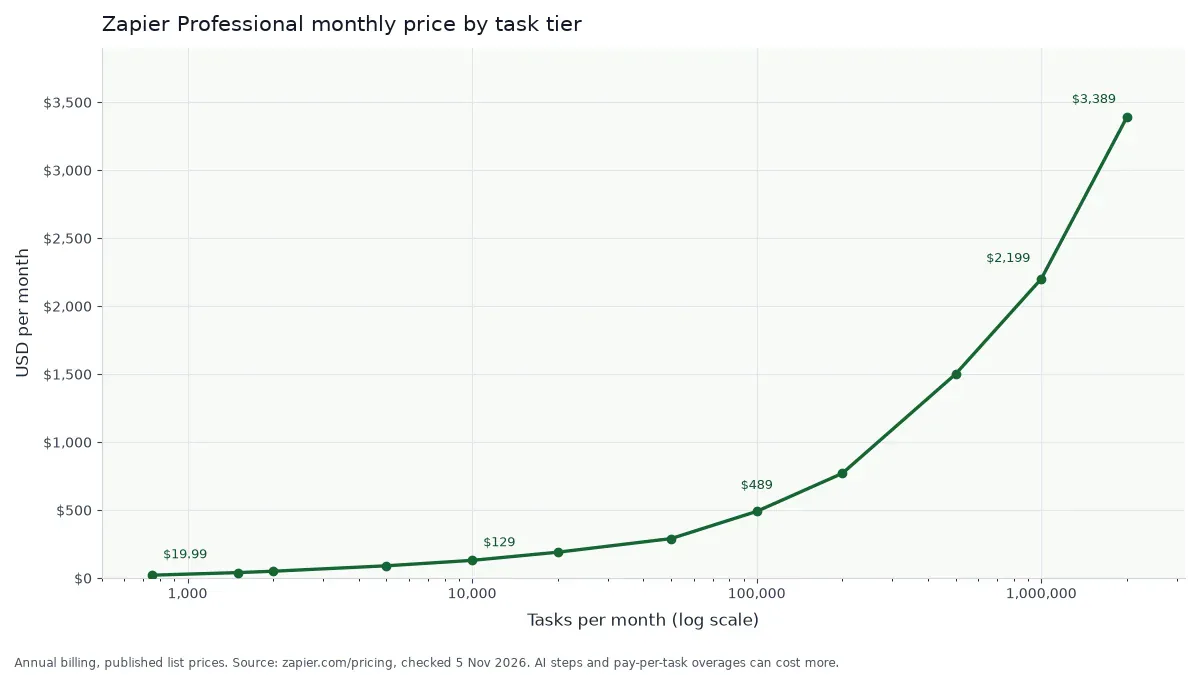
On Professional, billed annually, published tiers run from $19.99 a month for 750 tasks to $3,389 a month for 2 million tasks. The price per task falls as the tier rises: about 2.7 cents at 750 tasks, about 0.17 cents at 2 million. The monthly bill still goes from $19.99 to $3,389. Put the total in the forecast. The unit price is the vendor's story.
Past the tier, the meter runs, and then it stops. Extra tasks cost 1.25 times the plan rate on annual billing, and 2.5 times on monthly billing. The cap is three times the allowance in total. On a 750-task plan, Zapier's own walkthrough is 750 included tasks plus up to 1,500 pay-per-task tasks, then a pause until the cycle resets or you upgrade.
Applied to a busier tier, as arithmetic rather than a quoted invoice: Professional, annual, 10,000 tasks, listed at $129. The included rate is $0.0129 a task. Extras at 1.25 times that are about 1.6 cents. The pause arrives at 30,000 tasks, so the most you can add is 20,000, which is $322.50. The month lands near $452, and then the automations wait. Your billing page shows the exact rate if it differs.
The same meter, under other names
Make bills credits. On its pricing page, most actions cost one credit, some AI actions cost more, and a scenario with no credits left stops. Make's comparison with Zapier lists a free plan at 1,000 credits a month and Core from $9 a month, starting at 10,000 credits. Pro and Teams on that page start at $16 and $29 for the same floor. A help note from November 2025 said extra credits cost 25% more than credits in the plan. Check the live checkout. That note is a year old.
Glide Classic still sells Business from $199 a month on yearly billing, with 5,000 updates included and further updates at 2 cents. Updates cover data changes and syncs from Google Sheets, Excel, or Airtable. Glide's own tables do not consume updates. A month of 25,000 updates is $400 of overage, about $599 before extra users at $5 each past the 30 included. Single sign-on is Enterprise.
GlideOS, the newer AI builder, is a separate subscription. Its pricing page, updated September 2026, says there is no tool for moving a Classic app onto GlideOS. A new product from the same company is not an exit.
Softr's plan docs list annual prices of $19, $99, and $329 a month for Basic, Pro, and Business. The pricing page caps workflow actions at 500, 2,500, 10,000, and 25,000 a month across Free, Basic, Pro, and Business. Triggers do not count. At the cap, workflows pause. Business also tops out at 100 team users and 500 client users, even after add-ons.
Ceilings an upgrade does not remove
Airtable counts records per base, across every table. The published caps are 1,000 on Free, 50,000 on Team, 125,000 on Business, and 500,000 or more on Enterprise Scale. Over the cap, you can keep the base and you cannot add rows until you upgrade or delete some. Automation runs, counted when the trigger fires including failures, are 100, 25,000, 100,000, and 500,000 a month on those same four plans. The API rate on the limits page is 5 requests per second per base on every plan. A higher plan can lift the monthly call cap. It does not lift that per-second rate.
Bubble measures server work in workload units: searches, workflows, API calls. Its plan comparison lists 50,000 a month on Free, 175,000 on Starter, 250,000 on Growth, and 500,000 on Team. Overages on the paid plans, without a prepaid add-on, are $0.30 per 1,000 units. Turn overages off and hit the limit, and Bubble's docs say the app is taken offline until you buy more or the next period starts. Annual list prices for web only are $32, $119, and $349 a month on Starter, Growth, and Team. Web plus mobile is $59, $209, and $549. Each project needs its own plan.
Webflow is the one I would leave alone. It is a site builder. After the May 2026 change, Premium is $25 a month on yearly billing, with 20,000 CMS items. Bandwidth starts at 50 GB. Go over it for two billing months in a row and Webflow moves you up a tier. Fine for a marketing site. A poor home for the database that takes orders.
The control you need sits on a higher plan
Usage is half the surprise. The other half is sign-in, audit history, and where the bytes sit. Vendors put those on plans a small team does not see until a customer or an investor asks.
- Zapier. SAML single sign-on and an audit log start on Team, not on Professional. Team's entry tier is $69 a month on annual billing, at 2,000 tasks, for up to 25 users. The audit log keeps 6 months on Team and 1 year on Enterprise. Custom data retention, automatic user provisioning, and streaming logs to a tool such as Datadog or Splunk are Enterprise, which means a conversation with sales. The grid is on the pricing page.
- Airtable. SAML single sign-on starts on Business or Enterprise Scale. Business is $45 per billable user per month on annual billing, or $54 month to month, on the plan overview. Team, at $20 per user on annual billing, does not include SSO. On Team, commenters are billable, not only editors, so a "small" base can cost more than the people who build it. Data residency is Enterprise Scale only. The regions Airtable publishes are the United States, Europe, and Australia. There is no UAE region on that page. Even with residency turned on, usernames, password hashes, and a good deal of base metadata stay in US data centers. Bases in Europe or Australia can also respond more slowly, because some automation steps still coordinate with services hosted in the US. And a contract with residency enabled cannot be downgraded. When it ends, Airtable says it deletes the in-product data.
- Bubble. A choice of hosting region, including London and the UAE, is an Enterprise dedicated instance, along with single sign-on and read-only access to the Postgres database underneath. Self-serve plans do not offer that region list. You can own the rows and the design. Bubble's ownership page is plain about the rest. Bubble owns the code that runs the app. The app can only run on Bubble. There is no export of the application as code. You can export the data as CSV, JSON, or newline-delimited JSON, and you can pull it through the API. If you leave, the logic gets rebuilt.
- Glide and Softr. Single sign-on on Glide Classic is Enterprise. On GlideOS, single sign-on and audit logs are Enterprise. On Softr, SSO, SCIM, and audit logs are Enterprise. The $329 Business plan does not include them.
If a customer, a bank partner, or an investor asks where the data lives and who can sign in, the honest answer is the plan you pay for today. Whether Europe, London, or a UAE region meets a specific legal duty is a question for counsel in that country. The product question, which you can answer this week, is whether the vendor offers the region and the audit trail on a plan you can buy this quarter.
What a new hire or a buyer will ask
A developer you bring in can learn Bubble, and Bubble can be extended with plugins and APIs. They still cannot lift the application logic into a normal repository, because the vendor says that export does not exist. The week you want a second team, or you want to sell the company, someone will ask whether the product keeps working if you leave the platform.
That is a different question from who owns the GitHub repo, which only matters once a repo exists. I wrote the access checklist for that moment: Who Actually Owns Your Code? An IP and Access Checklist for Founders Hiring Developers. Read it before the first custom commit.
Two bills, one of them made up on purpose
The chart above is Zapier's published Professional price card. The table below is an illustration. It is one fictional company, using annual list prices from 5 November 2026. No overages, no plugins, no tax, no Glide, no Softr.
| Piece | Quiet month | Busier month |
|---|---|---|
| Zapier | Professional, 750 tasks, $19.99 | Team, 50,000 tasks, $399 |
| Airtable | Team, 3 billable users, $60 | Business, 8 billable users, $360 |
| Bubble | Starter, web only, $32 | Growth, web only, $119 |
| Total | $111.99 | $878 |
The quiet column is about $112 a month. The busier column is $878 a month, about $10,500 a year. The jump is what it looks like when the same company needs shared Zapier access and SAML SSO, so Team rather than Professional, plus more Airtable room and SSO, so Business and eight billable people, plus a Bubble app that has outgrown Starter. Your mix will not match these rows. The shape is the point. Activity and a short list of admin features move the bill in big steps.
Custom software does not erase $878 by magic. A custom core has a build cost, then hosting, then someone to keep it running. What changes is who decides the next increment. You pay when you choose to add a feature. You do not pay another slice every time a customer submits a form, unless you build it that way.
At Fionetix a scoped custom app is a fixed $1,999 Custom Software package, delivered in about a month, and you own the code. That is a first slice or a modest product. It is not a quote to clone a large Bubble system. If the quiet column still describes you, and nothing else in this post hurts, stay. $112 a month for a stack your team can change this afternoon is a bargain.
Stay on no-code when it is still earning its keep
Leave the stack alone when most of these are true:
- The workflow is still changing every week. You are learning what the business is.
- Volume sits inside the included allowance, and the invoice has been flat for a few months.
- The tool is a marketing site, a landing page, or a simple internal checklist. Webflow is good at the first two.
- You exported the data this month, and someone other than the builder opened the file.
- If the tool vanished for a weekend, you would be annoyed. You would still be able to take orders.
- You do not yet need company single sign-on, an audit log, or a hosting region the current plan does not sell.
I would rather see a Bubble prototype thrown away than a quarter spent encoding the wrong process in custom code. No-code is a cheap way to discover you were wrong. Use it for that, on purpose.
Move the core in slices
When that list stops being true, do not book a weekend to rebuild everything. The safe version is the same one I recommend for old custom systems, written up in Rewrite or Refactor? How Founders Should Decide What to Do With Legacy Software. The old thing keeps serving customers while you replace one piece at a time. Engineers call it the strangler pattern. For a no-code stack the order matters more than the name.
- Export the data first, and prove a second person can read it. A CSV from Airtable. CSV, JSON, or newline-delimited JSON from Bubble, or a script against the API if the file is too big to open by hand. If the export is duplicated columns and mystery IDs, cleaning that up is the project. A new database on top of a mess just stores the mess in a place you now pay to host.
- Write each money workflow in plain language. What starts it, what it changes, and what "wrong" looks like. One page. If you cannot do that, you are not ready to pay someone to rebuild it.
- Pick one core. Orders, billing, inventory, or who is allowed to see what. Not the homepage. Not the blog.
- Keep the no-code front. The Webflow site, the Softr portal, or the current Bubble screens can stay while your own API and database become the system of record for that one workflow. Where the no-code tool can call an API, point it at yours. Where it cannot, rebuild that one screen and leave the rest.
- Run both until the numbers match. Same inputs, same outputs, on real records. Cut over when they match. Roll back when they do not.
- Repeat. The old tool should get smaller. It ends as a brochure, a form, or a subscription you cancel.
- Put the new code in a repository your company owns, on a cloud account billed to you. That is the reason to leave.
Move the workflow that would stop the business if the vendor doubled the price or paused it at the cap. Leave the marketing site where it is.
A one-page checklist
Run this before you sign a rebuild, and again if you decide to stay.
- This month's invoice for every no-code tool, with the usage number written next to the price
- A data export a second person can open without the original builder in the room
- One page listing the workflows that would stop orders, billing, or delivery if they paused
- Which of those need single sign-on, an audit trail, or a hosting region the current plan does not include
- The ceiling an upgrade will not remove: records per base, a per-second API rate, a user cap, or logic you cannot export as code
- One workflow you could move in a few weeks, and the check that tells you it worked
- A named owner for the new repository, the domain, and the cloud account
How we handle the handoff
Founders in the US, the UK, the UAE, and Bangladesh bring us this stack when the invoice or the export starts to worry them. Sometimes the right answer is to stay, and that is what we say. Sometimes the right answer is one workflow, moved while the rest keeps taking orders.
A scoped build is the Custom Software package: a production app in about a month, fixed at $1,999, with the code and the IP in your company's name from the first commit. If the old system should stay and you want the manual steps around it automated instead, Legacy Automation is $1,499. If you only want a second pair of eyes on the invoices and the export, hourly consultancy starts at $30. Anything larger than a slice, with several integrations or data a regulator cares about, gets scoped before anyone quotes a rebuild.
You should be able to leave us as well. Same test.
Own the part that would hurt to lose
No-code got a lot of real businesses to their first customers without a hiring plan. It starts to cost more than the invoice when the meter, the cap, or the missing export sits on the workflow that takes the money.
Export the data. Price one workflow. Move that workflow. Leave the rest until it hurts.