

The most expensive work in your company is invisible
Ask a founder where the money goes and you will hear about salaries, cloud bills, and ad spend. You will rarely hear about the person who spends Tuesday afternoon copying order details from emails into the CRM, or the finance hire who rekeys every supplier invoice into the accounting system.
That work does not show up as a line item. It hides inside job descriptions. And because nobody budgets for it, nobody questions it.
It adds up faster than most people think.
What the 2025 data says
In July 2025, Parseur and QuestionPro surveyed 500 US professionals working in operations, finance, administration, IT, and customer support. The full report and the press release found:
- Respondents spend more than 9 hours a week moving data from emails, PDFs, spreadsheets, and scanned documents into other systems.
- That costs employers an average of $28,500 per employee per year.
- 56% have experienced burnout from repetitive data tasks.
- 50.4% said manual entry had led to errors with real consequences.
- 46% had never used any tool to automate data extraction or entry.
A fair warning: Parseur sells data extraction software, so it has an interest in this topic. Treat the exact dollar figure as a rough signal, not gospel. But the time figure matches what we see when we sit with operations teams. Almost every growing company has at least one process where a person is the glue between two systems that do not talk to each other.
Run the numbers for your own team
You do not need an industry average. You need your own number, and it takes ten minutes to get a rough one.
Take the hours a person spends on manual entry each week, multiply by about 48 working weeks, then multiply by what that person costs you per hour including benefits and overhead.
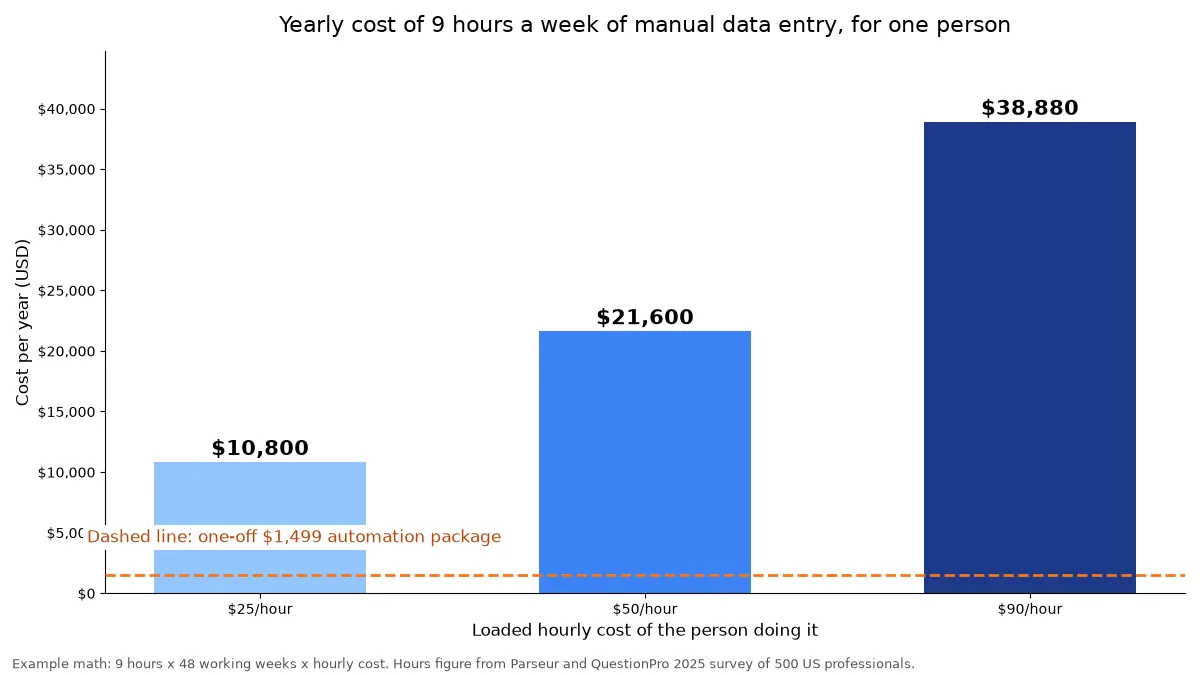
Even at the low end, one person doing this costs more than $10,000 a year. And the direct cost is only part of it. There is also:
- Error cleanup. A typo in an invoice amount or a customer email address creates work for someone else later.
- Delay. Data that waits in an inbox until someone has time to type it in means slower quotes, slower invoices, and slower replies to customers.
- Turnover. Good people do not stay long in jobs that are mostly retyping. Replacing them costs far more than the hours themselves.
- Opportunity cost. Every hour spent on entry is an hour not spent talking to customers or fixing real problems.
Where the retyping usually hides
In the companies we work with across the US, UK, and UAE, the same patterns come up again and again:
- Email to system. Orders, leads, or booking requests arrive by email and someone copies them into a CRM, ERP, or spreadsheet.
- PDF to accounting. Supplier invoices, receipts, and purchase orders get read by a human and typed into the books.
- Spreadsheet as middleware. Data is exported from one tool, cleaned up in Excel, and imported into another, every week, by hand.
- Old internal software with no API. A legacy system that still runs the business but only accepts input through its own screens.
- Status updates. Someone checks one system and manually updates another so customers or managers can see progress.
The giveaway is when someone says "I just copy it across, it only takes a few minutes." Ask how many times a day. That answer is usually where the hours are.
What to automate first
Not every manual task is worth automating. The best first targets share three traits:
- High volume. It happens daily or weekly, not once a quarter.
- Clear rules. A person follows the same steps each time, with few judgment calls.
- Structured or semi-structured input. Emails, PDFs, and forms with a predictable shape.
A simple way to rank your options: list each manual process, estimate hours per week, and mark how rule-based it is. Start with the one that has the most hours and the fewest exceptions. Get that working, measure the time saved, and move to the next.
What modern automation can and cannot do
Automation used to mean brittle scripts that broke the moment a supplier changed their invoice layout. That has changed. Modern AI models are now good at reading messy inputs like emails, scanned PDFs, and free-text notes, and turning them into clean, structured data.
That opens up processes that were too messy to automate a few years ago. But a few things still matter:
- Keep a human in the loop for exceptions. Let the system handle the routine 80% and flag anything unusual for review, rather than trusting it blindly.
- Log everything. You should be able to see what was extracted, from which document, and when.
- Work with your existing systems. Most companies do not need a new platform. They need the old one connected properly, even if that means working around a system with no API.
- Mind your data. Customer and financial data passing through automation needs the same security care as anywhere else in your stack.
How we help
At Fionetix, our Legacy Automation package is built for exactly this: automating manual workflows inside the software you already run, including older systems that were never designed to connect to anything.
- Workflow mapping to find where the hours actually go
- Automation built into your existing or legacy systems
- AI-assisted extraction for emails, PDFs, and documents where it makes sense
- Documentation and a clean handover, with 100% of the code and IP yours
It is a fixed $1,499 package. If you want ongoing help, our monthly retainer is $1,899, and hourly consultancy starts at $30. We have spent more than ten years building software where mistakes are expensive, including banking platforms and systems for the Bangladesh Navy and Army, so we take accuracy and security seriously.
Count the hours this week
Pick one team, ask them to note every time they copy data from one place to another for a week, and add it up. Most founders are surprised by the number.
Then automate the biggest one. The payback is usually measured in weeks, not years.