

Your cloud bill is not big because your product is big
Here is a pattern I see a lot. A startup launches on AWS, Azure, or Google Cloud with a small setup. Two years later the product has grown a bit, the team has grown a bit, and the cloud bill has quietly tripled.
Nobody made one bad decision. A developer spun up a bigger database "just for the migration." A staging environment was cloned for a demo and never deleted. Logs are kept forever because that is the default. Each line on the invoice looks reasonable. Together they add up to a second salary.
The good news is that most of this waste is boring, easy to find, and safe to remove. You do not need a FinOps team or a six-month project. You need someone to actually look, in the right order.
How much of the bill is waste?
More than most founders expect.
Flexera's 2025 State of the Cloud Report surveyed 759 cloud decision-makers worldwide. 84% said managing cloud spend is their top cloud challenge, ahead of security. Respondents estimated that 27% of their IaaS and PaaS spend is wasted, and 24% of their software spend in public cloud is wasted too. On average, cloud budgets were exceeded by 17%, and spend was still expected to grow 28% over the following year.
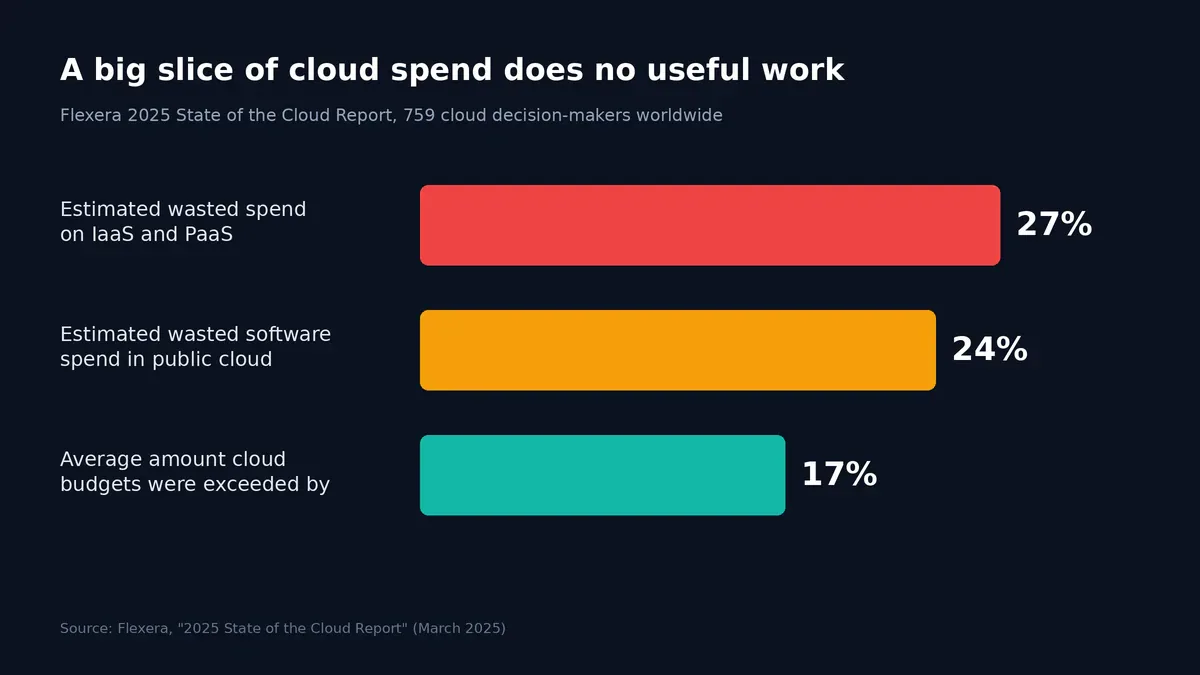
Those are mostly larger companies with dedicated cloud teams. Smaller startups usually have less process, not more, so I would not assume you are doing better.
Before you cut anything: what not to touch
I spent years building banking software and systems for the Bangladesh Navy and Army, and bug hunting put me in Meta's Hall of Fame. That background makes me careful about one thing: cost cutting is the easiest way to quietly weaken security or lose data.
A cheaper bill that leaves you unable to recover from an outage, or to investigate a breach, is not a saving. It is a deferred invoice.
The order I would work through
The trick is to start with fixes that carry almost no risk, and only move to the ones that change how your system runs once you can see clearly.
1. Make the bill readable
You cannot cut what you cannot see. Tag every resource with at least an environment (production, staging, dev) and an owner or feature. Turn on a monthly budget with alerts, and switch on anomaly detection. AWS has Budgets and Cost Anomaly Detection, Azure has Cost Management budgets, and Google Cloud has budget alerts. All of them are free or close to it.
Then look at the top ten line items. In most startups, a handful of services make up the bulk of the bill. That is where your time should go.
2. Delete the zombies
These are resources that cost money and do nothing:
- Storage volumes no longer attached to any server
- Old snapshots and machine images from experiments months ago
- Load balancers with no healthy targets behind them
- Test databases and clusters from a proof of concept nobody finished
- Unused public IP addresses (AWS has charged for every public IPv4 address since February 2024, attached or not)
This is the safest money you will ever save. Confirm each one has no owner, take a final backup if in doubt, and remove it.
3. Turn off non-production at night
Staging, QA, and dev environments rarely need to run 24 hours a day, 7 days a week. A week has 168 hours. If your team works roughly 12 hours a day on weekdays, that is 60 hours. Scheduling those environments to shut down outside working hours cuts their compute cost by about 64%.
If your team spans the US, UK, and UAE time zones, set the window to cover everyone. It still usually leaves weekends and the middle of the night off.
4. Right-size what is left
Look at average CPU and memory over the last 30 days. A database server sitting at 8% CPU is a very common sight. Drop it one size, watch it for a week, and repeat if it is still idle. Moving to a newer instance generation often gives better performance for the same or lower price as well.
Do this one service at a time, starting with non-production, so a mistake costs you an afternoon and not an outage.
5. Commit only to the load you are sure of
Once you know your steady baseline, discounted commitments are the biggest single lever. On AWS, Compute Savings Plans offer up to 66% off On-Demand prices, and EC2 Instance Savings Plans up to 72%, in exchange for a one or three year commitment. Azure and Google Cloud have similar reservation and committed use discounts.
The rule is simple: commit to the floor, never the peak. If your servers never drop below a certain level, commit to that. Leave growth and spikes on regular pricing.
For work that can be interrupted, like CI builds, batch jobs, and some background workers, AWS Spot Instances can be up to 90% cheaper than On-Demand. The catch is that AWS can take them back with two minutes' notice, so they only suit workloads that can restart cleanly.
6. Check data transfer, NAT, and logs
This is where hidden costs live, and they rarely show up in architecture diagrams:
- Data transfer. Traffic out to the internet and between regions or availability zones is billed. A chatty service in the wrong place can cost more than the servers running it.
- NAT gateways. Private servers pulling large amounts of data through a NAT gateway pay processing fees on every gigabyte. On AWS, a gateway endpoint for S3 avoids that for S3 traffic at no extra charge.
- Logs. On AWS, CloudWatch log groups are kept forever by default. Set a retention period that matches what you actually need, and archive the rest to cheaper storage.
- Storage tiers. Old files and backups can move to infrequent access or archive tiers automatically with lifecycle rules.
7. Watch the new line item: AI
Flexera found that 83% of respondents were already using or experimenting with generative AI services. AI API and GPU costs can grow faster than anything else on the bill, because usage scales with every user and every prompt.
Cap spending per environment, cache repeated results, use smaller models for simple tasks, and log token usage per feature so you know which part of the product is driving the cost.
A quick checklist for this week
- Every resource tagged with environment and owner
- Monthly budget alert and anomaly detection switched on
- Top ten cost line items reviewed
- Unattached volumes, old snapshots, idle load balancers, and unused IPs removed
- Non-production environments on a shutdown schedule
- Oversized servers and databases flagged for right-sizing
- Steady baseline identified before buying any commitment
- Log retention set on every log group
- Backups, security logs, and monitoring confirmed untouched
When the cloud is not the right home
Sometimes the honest answer is that a workload does not belong on hyperscale cloud at all. A steady, predictable app with no big traffic swings can be much cheaper on a well-managed dedicated server or a smaller provider. Flexera's report found that about 21% of cloud workloads had been moved back out of public cloud, even as overall cloud use kept growing.
That is not a reason to panic and migrate. It is a reason to ask the question once a year, with real numbers. Data residency matters too: if you serve UK or UAE customers with personal or financial data, pick the region for compliance first and price second.
If the expensive part of your bill is an old system that nobody wants to touch, the fix may be in the code rather than the infrastructure. I wrote about that decision in Rewrite or Refactor? How Founders Should Decide What to Do With Legacy Software.
The most expensive server is the one nobody remembers creating. Before you negotiate discounts or move providers, find out what you are actually running and why.
How we help at Fionetix
Cost tuning is part of how we run Maintenance and DevOps for clients: monitoring, CI/CD, and cloud or bare-metal deployments set up to stay fast, secure, and sensibly priced. For older stacks that have grown messy, our Legacy Fix and Server package covers diagnosis, security hardening, and server setup and management in one go.
If you just want a second pair of eyes on your bill, an hour or two of consultancy is often enough to find the first few thousand dollars. We will never trade away your backups or security logging to get there.
Start with one hour
Open your billing console, sort by cost, and look at the top ten lines. Ask "what is this, who owns it, and do we still need it?" for each one. You will probably find something to delete before the hour is up.